
If you’re deciding between SaaS vs custom software, the most reliable answer is usually “both”—but not everywhere. A two-speed approach puts fast-changing, customer-facing work on flexible tools (often SaaS) while reserving custom development for the capabilities that differentiate your business or must meet strict constraints. The goal is speed and control, without chaos.
The problem is that “buy vs build” discussions often get reduced to preferences: engineers want control, business teams want speed, and finance wants predictability. What gets missed is that different parts of your company have different change rates and different risk tolerances, so they shouldn’t share the same delivery model.
In practice, the best outcomes come from matching the tool to the capability, then governing the seams: integration, identity, data, and change management. This is where a two-speed strategy turns SaaS vs. custom software into an operating model instead of a one-time decision.
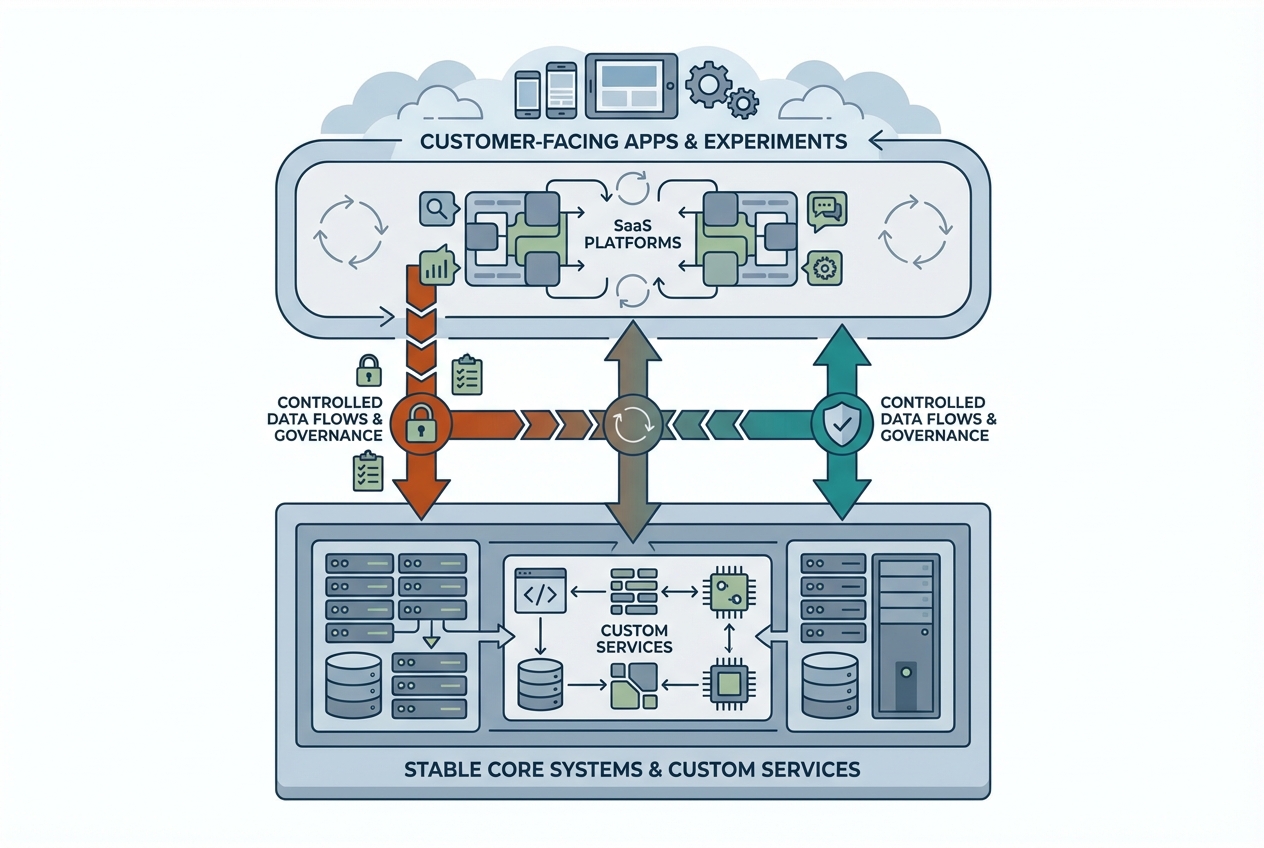
What “Two-Speed” Really Means (and Why It Matters)
“Two-speed” doesn’t mean “IT is slow and the business is fast.” It means you intentionally run two delivery tempos: one optimized for rapid iteration and experimentation and one optimized for stability, auditability, and long-term maintainability. The faster stream often relies on configurable SaaS and composable tools; the slower stream typically centers on core data and systems of record.
The distinction matters because most organizations are trying to do both at once: launch new experiences quickly while also protecting customer data, ensuring reliability, and keeping costs under control. When you force everything into one tempo in SaaS vs custom software decisions, you either slow innovation to protect the core or you destabilize the core to ship faster.
Fast-moving customer-facing needs vs stable core systems
Customer-facing workflows—onboarding, self-serve journeys, pricing experiments, and campaign tracking—change constantly because markets change constantly. That’s where SaaS integration, workflow tools, and configurable platforms can create speed without requiring a full engineering backlog for every change in SaaS vs. custom software choices.
Core systems—identity, billing logic, entitlements, data models, and regulatory reporting—tend to punish “quick fixes.” These are the capabilities where brittleness becomes expensive and where custom software development can be justified, especially if the logic is central to your business model.
Where do two-speed strategies fail, and how can we prevent it?
Two-speed fails when teams treat SaaS as “no-code, no-governance” and custom as “engineering’s playground.” That creates tool sprawl, duplicate sources of truth, and security gaps—especially when each department independently adopts new platforms in SaaS vs custom software decisions.
It also fails when “speed” becomes an excuse to hard-code brittle workarounds inside tools that were meant to be configured. The fix is to standardize how tools connect, how data is owned, and how changes get reviewed—so the organization can move quickly without accumulating invisible risk.
SaaS vs Custom Software: The Decision Criteria That Drive Outcomes
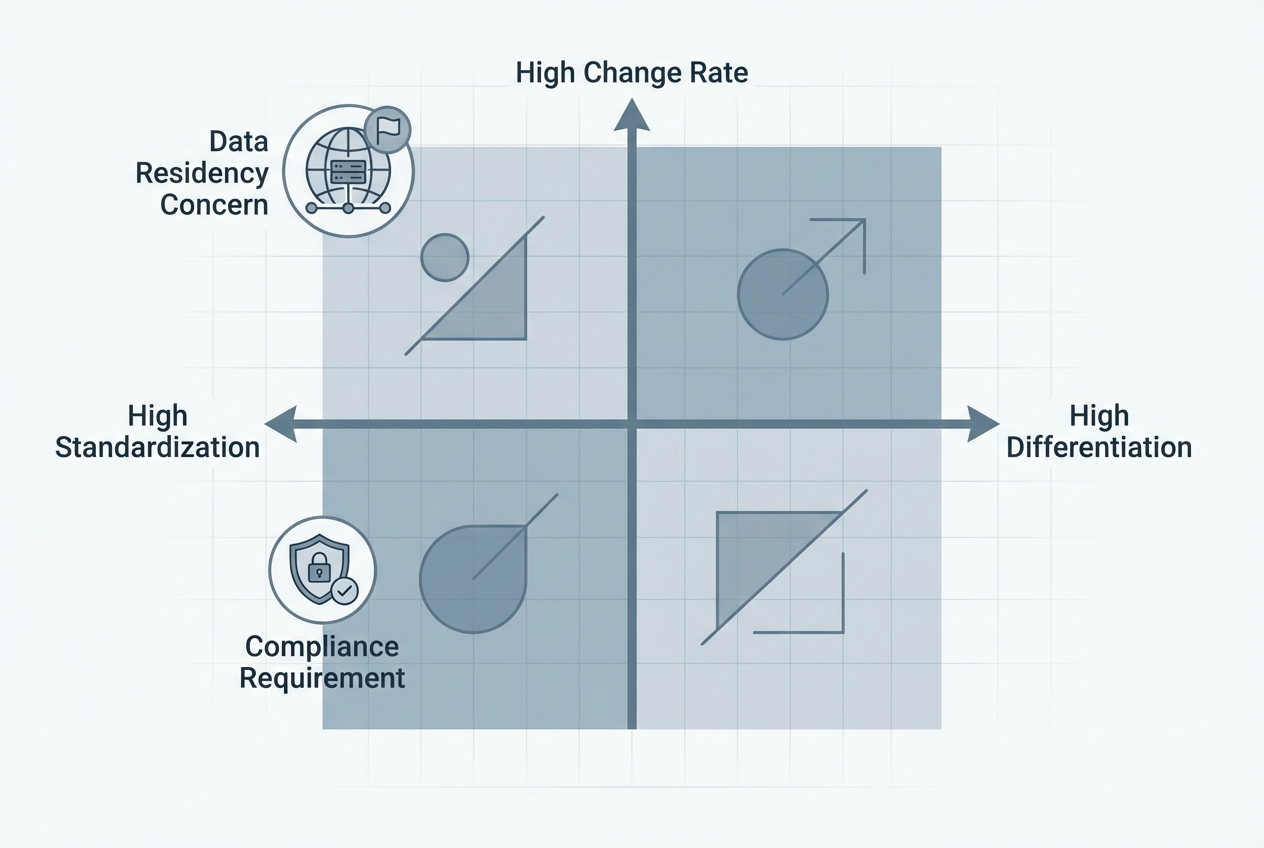
Most teams start with surface-level comparisons: features, UI, and subscription price. Those are real inputs, but they rarely determine whether the solution succeeds one year later. The outcomes are usually driven by deeper forces: differentiation, complexity, compliance posture, and how often requirements change.
A useful way to think about SaaS vs. custom software is to ask, “What are we willing to standardize?” and “Where must the software adapt to us?” The clearer you are on those two questions, the less you’ll overspend on custom-built—or over-customize a SaaS platform until it behaves like fragile bespoke code.
Differentiation: Is this capability a competitive advantage?
If a capability is truly differentiating—meaning it changes your win rate, retention, or margins—owning it can be worth the investment in SaaS vs custom software. That doesn’t automatically mean custom code, but it often means you need deeper control over workflows, data models, and the roadmap than a generic SaaS can provide.
For instance, a usage-based pricing B2B platform may find its entitlement logic to be its unique selling point. Instead of bending a billing SaaS with heavy custom rules, the team builds a small custom service for entitlements and uses SaaS for invoicing and payments, where standardization is acceptable.
Complexity and change rate: how often requirements shift
High change rate favors SaaS, but only if you can express changes through configuration, not code. When changes require repeated custom extensions, you lose the speed benefit and inherit ongoing maintenance risk—often without the observability and testing discipline you’d apply to custom software in SaaS vs. custom software decisions.
On the other hand, high complexity sometimes favors a custom build even when you want speed. The key is whether the complexity is core to the business or just the result of inconsistent processes that could be standardized before you pick a tool.
Compliance, data residency, and security constraints
Compliance isn’t only about checking boxes; it shapes your architecture. Data residency, audit trails, encryption requirements, and vendor risk reviews can make certain SaaS tools impractical—or at least slow enough that “buy is faster” stops being true in SaaS vs custom software evaluations.
For regulated teams evaluating SaaS vs custom software, the decision often comes down to control over data flows and evidence. If you can’t prove who accessed what, when, and why—or can’t reliably export data for audits—your “fast” choice can become the most expensive choice later.
Cost, Timeline, and Risk: A Practical Comparison
The hardest part of SaaS vs custom software is that the obvious costs show up in different places. SaaS costs look clean on a budget line, while custom-built costs show up as headcount and time. But both approaches have second-order costs: integration work, process change, security overhead, and long-term ownership.(See this detailed TCO breakdown from Gartner for more: Gartner – SaaS vs Custom Software TCO).
Timelines can also be counterintuitive. Buying can be fast to sign and slow to implement; building can be slow to start and fast to iterate once foundations are in place. The comparison gets clearer when you treat time-to-value and software total cost of ownership as connected, not competing, metrics.
| Factor | SaaS (buy) | Custom build |
|---|---|---|
| Upfront cost | Lower initial spend; implementation and migration can dominate | Higher initial engineering cost; architecture and delivery setup matter |
| Ongoing cost | Licenses grow with usage; admin and integrations become “hidden payroll.” | Maintenance, on-call, upgrades, and refactors are predictable but real |
| Time-to-value | Fast if workflows match the product; slower with heavy customization | Slower to first release; faster iteration for your exact workflow |
| Risk profile | Vendor, roadmap, and contract risk; operational risk shifts to integrations | Delivery and talent risk; operational risk stays internal |
| Flexibility | High via configuration; limited when needs diverge from the platform | High when designed well; low if rushed or underfunded |
| Lock-in | Switching costs can be high due to data models and embedded processes | Lower vendor lock-in; higher dependency on internal knowledge |
Total cost of ownership (licenses vs engineering + maintenance)
SaaS costs are easy to forecast at first: subscription, implementation partner, maybe a few add-ons. Over time, the cost picture shifts toward “everything around the tool”: iPaaS subscriptions, data sync jobs, additional environments, custom reporting, and the internal team needed to keep the system healthy.
Custom software development flips that. You pay more upfront, but you can keep the footprint lean if you design for operability—logging, testing, secure defaults, and simple deployment patterns. The most common mistake is treating a custom build as a one-time project instead of a product with a lifecycle in SaaS vs custom software decisions.
Time-to-value and opportunity cost
Time-to-value isn’t just “go live.” It’s when users adopt the workflow, and it reliably produces the outcome you need. In SaaS vs custom software decisions, opportunity cost is often the biggest hidden variable: every month spent fighting a misfit tool is a month not spent improving customer experience or revenue operations.
That’s why the fastest approach is frequently a staged approach: buy the commodity, build the differentiator, and integrate them cleanly. You reduce time lost to reinvention while still investing in what makes the business unique.
Vendor lock-in vs internal dependency risk
Vendor lock-in isn’t inherently bad; it’s bad when you don’t realize you’re locked in until you need to change. Deep customization, proprietary workflows, and hard-to-export data can turn a reasonable SaaS contract into a multi-year constraint—especially after business units build critical processes on top of it.
A custom build has a different risk: internal dependency. If only one team understands the system and it lacks documentation, tests, and operational runbooks, the organization becomes fragile. The trade-off in SaaS vs custom software isn’t “lock-in or freedom,” but “which dependency can you govern best?”
Implementation Patterns for a Two-Speed Stack
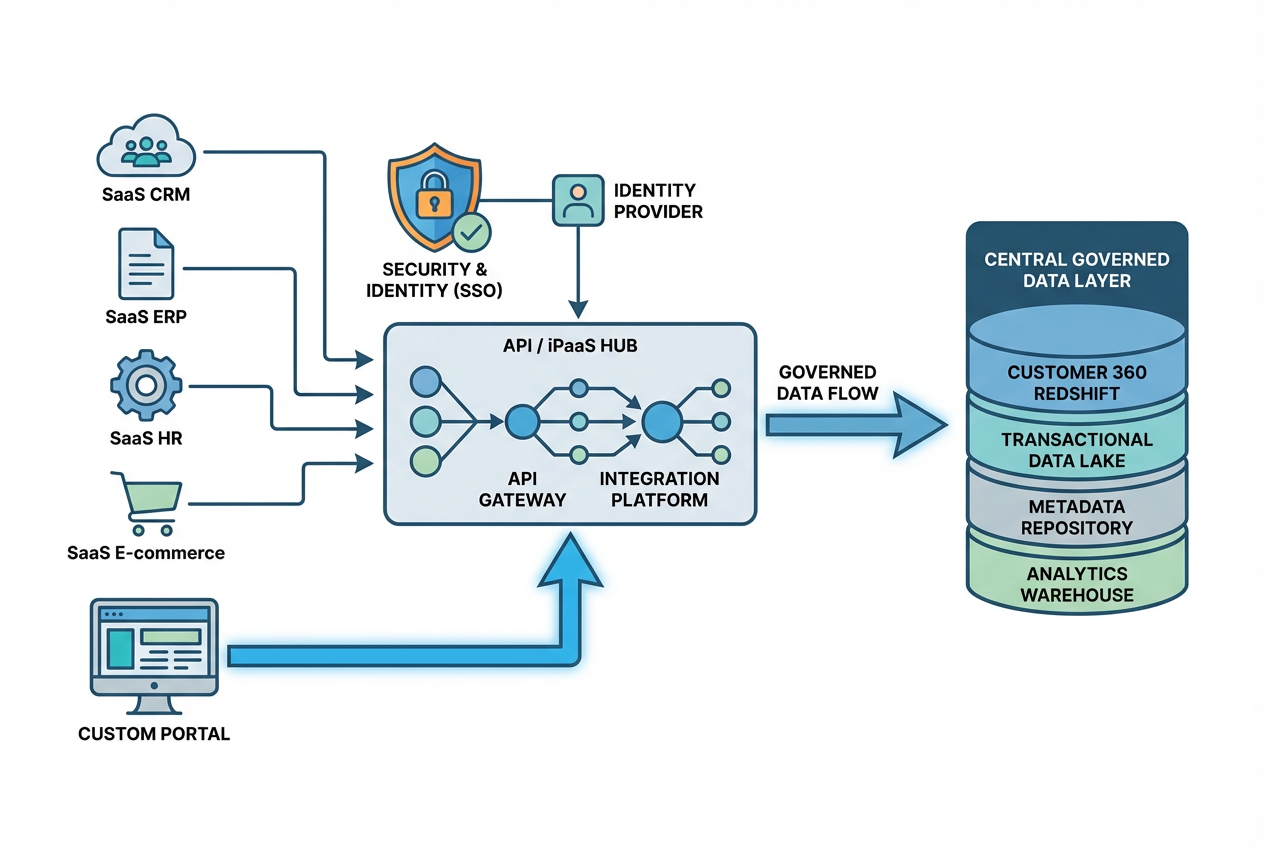
A two-speed strategy succeeds or fails at the boundaries: how systems share data, how identities are managed, and how changes are reviewed. If those seams are weak, “fast” systems create downstream cleanup work for the core, and the core becomes the bottleneck everyone works around.
The practical goal is to make SaaS feel interchangeable where it should be interchangeable and to make custom components feel safe to run and evolve. That takes an integration-first mindset plus lightweight governance that keeps teams moving without creating tool sprawl.
Integration-first architecture (APIs, iPaaS, data sync)
The hidden costs of “customizing SaaS” are usually integration costs. The more you stitch tools together with brittle scripts or one-off automations, the more you pay in outages, duplicate records, and reporting disagreements. A stable pattern—APIs, event-driven sync, or a governed iPaaS—reduces that operational drag.
When evaluating SaaS vs custom software, ask what happens when a field changes, an object schema updates, or a vendor releases a breaking API version. If the answer is “we’ll find out in production,” you don’t have an architecture yet—you have a collection of tools.
Guardrails: security reviews, procurement, and change management
Two-speed governance should feel like a paved road, not a roadblock. The intent is to standardize the few decisions that create outsized risk: authentication, data classification, vendor risk, and who can deploy changes that affect customers or compliance evidence.
These guardrails are also how you prevent tool sprawl. If every new SaaS purchase requires identity integration, a data owner, and an exit plan, teams will naturally consolidate around the tools that fit—without a heavy-handed mandate.
- Standardize identity and access: SSO, role-based access, and least-privilege defaults so new tools don’t become new attack surfaces.
- Define data ownership: one system of record per domain, with clear sync direction and documented fields.
- Require an integration plan: APIs, webhooks, or iPaaS patterns that can be monitored and tested.
- Create an “exit path”: export formats, data retention, and contract terms that keep vendor lock-in intentional.
Managing customization: configuration vs code vs extensions
Customization exists on a spectrum. Configuration (fields, workflows, permissions) is usually safe and upgrade-friendly; code inside the platform (scripts, templates, heavy automations) starts to accumulate maintenance debt; external extensions (services you own) can be safest when they’re designed like products, tested, and monitored.
The risk of customizing SaaS platforms is that you can end up paying for both worlds: subscription fees plus engineering-like maintenance, but without the engineering discipline that keeps systems reliable. If the customization you need changes core behavior, touches critical data, or can’t be tested, it’s a strong signal to reconsider the split in SaaS vs custom software.
Real-World Scenarios (Common Use Cases)
Teams rarely choose one approach for everything. What they’re really doing is placing bets: where to standardize to move faster and where to invest to create leverage. Seeing common patterns can help you apply a buy vs. build framework for B2B software without reinventing the debate each quarter.
As you review these scenarios, focus on the “why,” not the brand names. The right boundary is the one that keeps differentiation close to your team and pushes commodity work to tools that are designed to do it at scale—while keeping data and security coherent across the stack.
Go-to-market tooling (CRM, marketing automation, analytics)
GTM stacks are where SaaS vs custom software usually starts, because SaaS dominates the category. SaaS is typically the right choice for CRM and marketing automation, but the differentiation often lives in your data model, your routing rules, and the way product usage and revenue signals feed into lifecycle journeys.
In these cases, the winning pattern is often “buy the platform, customize lightly, and build a clean data layer.” That keeps sales and marketing moving while giving you control over metrics, attribution logic, and forecasting inputs that executives depend on.
Workflow automation and internal ops
Internal operations are tempting to overbuild because every team has “unique” processes. Before you build, check whether the uniqueness is valuable or just historical. Often, a SaaS workflow tool plus well-governed integrations solves 80% of the need and buys time to standardize.
Example: A services organization automates onboarding with a ticketing SaaS and a lightweight iPaaS flow that creates projects, assigns roles, and triggers customer emails. Later, they built a small custom scheduling component only after they had enough volume to prove that scheduling optimization is a real constraint, not a preference.
Customer portals and differentiated product experiences
Customer portals sit at the intersection of brand, product, and data access. When the portal is a key part of the product experience—especially in B2B—a custom build is often justified so you can control performance, UX, authorization, and experimentation.
That said, even portal-heavy products benefit from a two-speed mindset: use SaaS for commodity needs like support, knowledge base, or communications, and connect those tools via APIs so the portal stays focused on the differentiated journey. The balance you’re looking for in SaaS vs custom software is a portal that feels bespoke without requiring bespoke work for every adjacent function.
Next Steps / CTA
If you’re still stuck on SaaS vs custom software, it’s usually because you’re trying to decide without enough clarity on requirements, constraints, and integration realities. The fastest way forward is to turn opinions into scores: differentiation, change rate, compliance impact, integration complexity, and total cost of ownership over 3–5 years.
Use a buy-vs-build scorecard and validate it with a 2–4 week discovery. In that window, you can map the target workflows, confirm data ownership, prototype key integrations, and identify where customization becomes code—and where code becomes a product you must operate.
FAQs
Is SaaS always cheaper than custom software? No. SaaS can be cheaper early on, but at scale the combination of licenses, premium tiers, admin time, and integrations can outgrow expectations. A realistic SaaS vs custom software cost comparison includes both operating effort and long-term switching costs.
What is the biggest risk of building custom software? Underfunding ownership after launch. If teams build without a plan for maintenance, monitoring, security updates, and documentation, the solution becomes fragile and expensive to change.
How much customization is too much for a SaaS product? When the “configuration” can’t be tested, breaks during upgrades, or requires specialists to keep running, you’ve crossed into platform engineering without the controls. That’s often the inflection point to revisit SaaS vs custom software boundaries and move critical logic into owned services.
Can a two-speed approach work for regulated industries? Yes, and it can be safer than ad-hoc buying—if governance is built in. Regulated teams should standardize identity, logging, evidence collection, and data residency controls so the “fast” lane still produces audit-ready outcomes.
What data should we collect before deciding to buy vs build? Capture current process steps, expected volumes, required integrations, compliance constraints, and where requirements are likely to change in the next 12–24 months. Pair that with a TCO model so SaaS vs custom software is evaluated on outcomes, not just price.
How do we prevent tool sprawl in a two-speed model? Set a small number of mandatory standards: SSO, data ownership, integration patterns, and procurement/security review thresholds. This keeps local teams fast while ensuring the organization doesn’t accumulate unmanaged apps.
What’s the hidden cost of “customizing SaaS”? It’s usually the compounding maintenance of automations and integrations that no one “owns,” plus the business disruption when upgrades change behavior. Over time, these risks of customizing SaaS platforms can erase the initial speed advantage.
How do we know if we should build an integration or use an iPaaS? If the workflow is business-critical, needs testing and version control, or requires complex transformation, building (or owning a managed integration layer) is often safer. For simpler sync and quick iteration, iPaaS can accelerate delivery—especially in a mixed SaaS vs custom software stack.